
Descript Review: Is It Free, and Which Plan Do You Need?
11 min read
- Free with limits
- Audio
- Web · Windows · Mac
- Free $0 1 media hour/month · 720p with watermark
- Hobbyist $24/mo 10 media hours/month · $16/mo billed yearly
Checked on
Open Descript
My verdict
In IT since 2002: systems, engineering, web development and SEO. I have been doing business with AI since February 2023, when ChatGPT could first be bought in Spain.
Descript is a video and audio editor built around the transcript: the idea is that you edit a recording by editing its text, like a document, and an AI co-editor called Underlord takes edits you ask for in plain language. The free plan needs no card, but it's a trial in disguise: 1 hour of media a month, 100 AI credits once, and video exports at 720p with a watermark. Hobbyist costs $24 a month, or $16 a month billed yearly, and removes the watermark. When I tried it, deleting a sentence from the transcript cut it from the video in one go. Worth it if you make talking videos or podcasts; less so if you only need a transcript.
What is Descript
- Type
- Audio
- Platforms
- Web · Windows · Mac
- Free plan
- Free with limits
- Updated on
- Nov 7, 2026
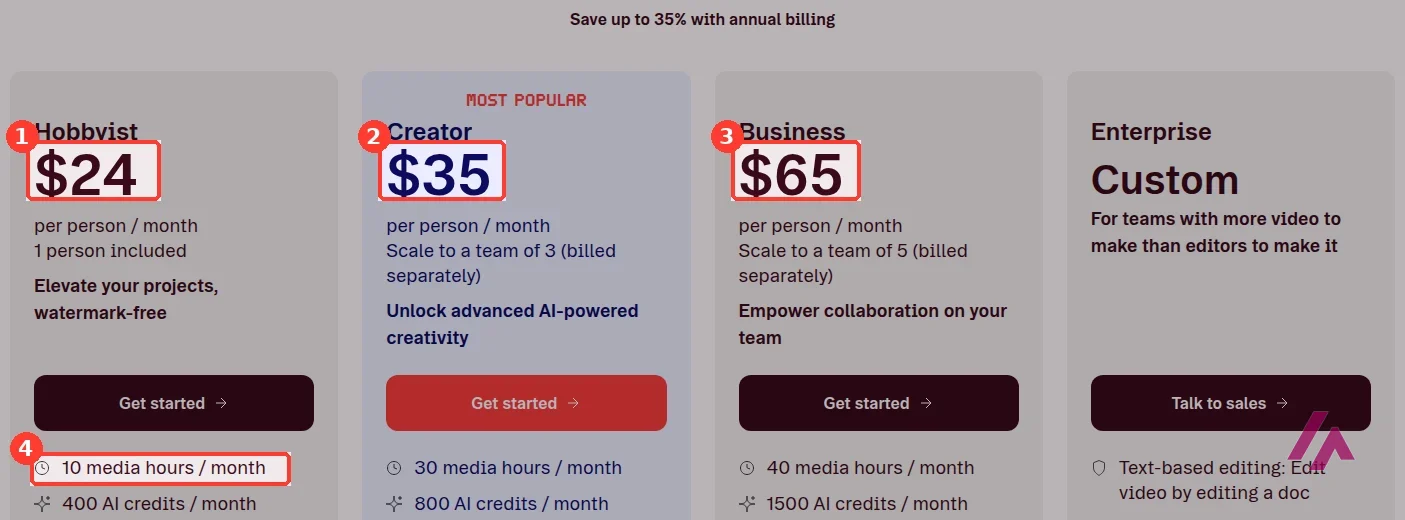
Descript is a video and podcast editor where you edit the recording by editing its transcript. The pitch is simple: delete a sentence from the text and it's gone from the recording too, and when I tried it, that's exactly what happened. Is Descript free? Yes, there's a free plan with no card, but it's really a trial: 1 hour of media a month, 100 AI credits that don't renew, and 720p video exports with a watermark. The paid plans are Hobbyist at $24 a month ($16 a month billed yearly), Creator at $35 ($24 yearly) and Business at $65 ($50 yearly), all per person.
Descript pricing, the short version (Important)
- Free: 1 hour of media a month, 100 AI credits one time, 720p video exports with a watermark, 5 GB of storage.
- Hobbyist: $24 a month, or $16 a month billed yearly. 10 media hours and 400 AI credits a month, 1080p exports with no watermark.
- Creator: $35 a month, or $24 a month billed yearly. 30 media hours and 800 AI credits a month, 4K exports, top-ups available.
- Business: $65 a month, or $50 a month billed yearly. 40 media hours and 1,500 AI credits a month, translation and dubbing, priority support.
- Enterprise: custom pricing, through sales.
- Prices are per person, shown in dollars, and the page doesn't mention tax.
What Descript does
Most video editors start with a timeline. Descript starts with a document. You upload or record a video or an episode, Descript transcribes it (in 25 languages, according to its plan table), and from then on the transcript is the editing surface: delete a word and the clip loses that word. For people who talk on camera or into a mic, that's a lot less fiddly than hunting for an um in a waveform.
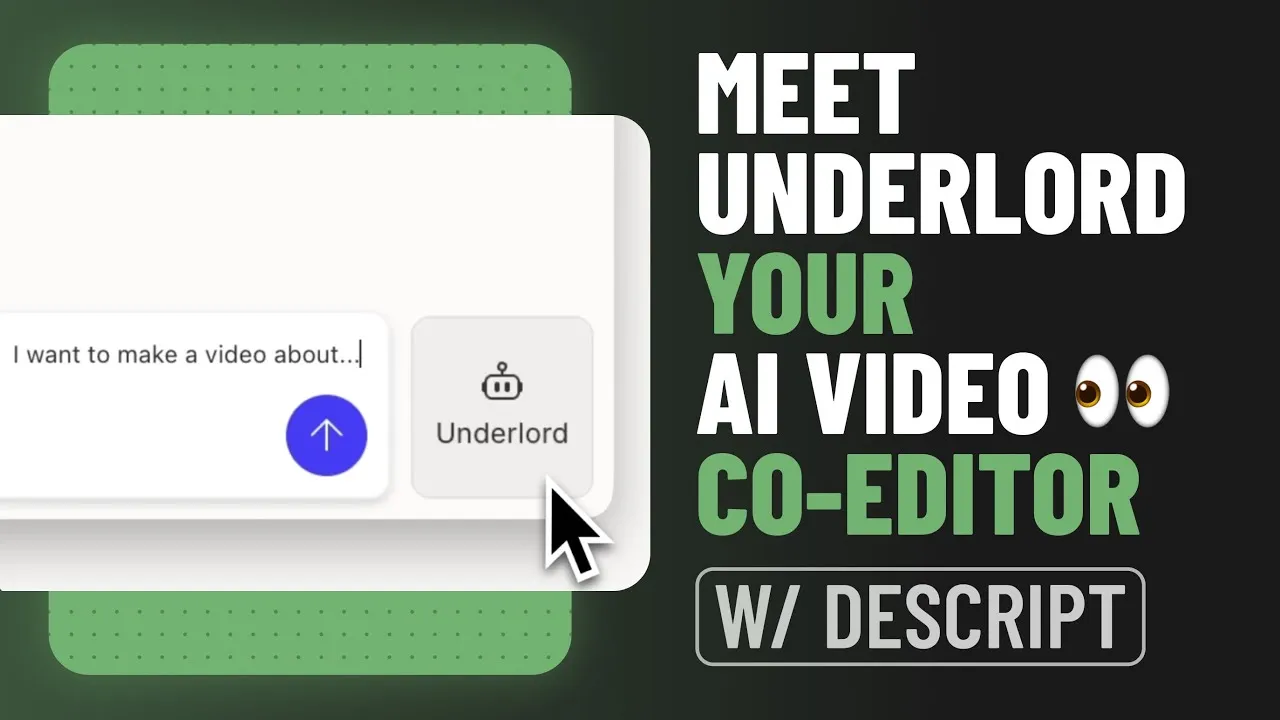
On top of that sits a long list of AI tools (Studio Sound, Remove Filler Words, Shorten Word Gaps, Eye Contact, Green Screen, Create Clips and more), and the FAQ says AI credits pay for features like Studio Sound, Green Screen and Eye Contact. There's also AI Speech, with text-to-speech, custom voice clones and a "Regenerate" feature. And then there's Underlord, which Descript calls its AI video "co-editor": you ask for edits in plain language, and Descript's own short video in this review shows how.
What happened when I edited a clip
Signing up with Google took a few clicks. Descript asked what I was going to use it for and what kind of project I wanted to start, showed me its plans and asked about sharing my data (more on that below). No card and no phone number. The home screen then showed my two meters right away: 60 minutes of media and 100 AI credits.
For the test I uploaded a 59-second video: a recording of a Spanish poem over a plain blue background. It's the clip I use to test transcription tools, so I know exactly what it should say. It didn't ask me which language it was. It worked that out by itself, and a few moments later the poem was there as text. I didn't spot a single misheard word, and it even got the punctuation of the dialogue right. The media counter dropped from 60m to 59m, which is the meter explained below working as advertised: the clip counts the moment you upload it.
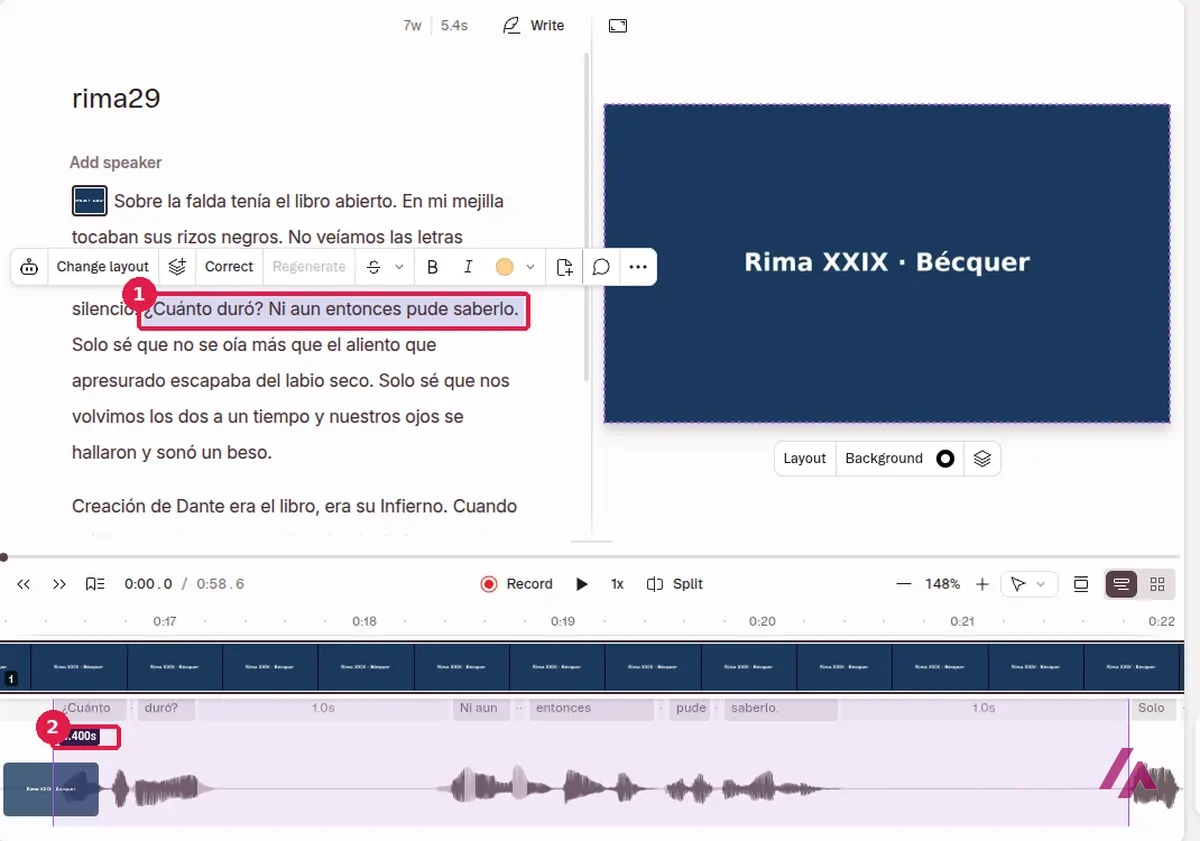
Then the fun part. I selected one sentence in the transcript, 7 words that Descript measured at 5.4 seconds on the timeline.
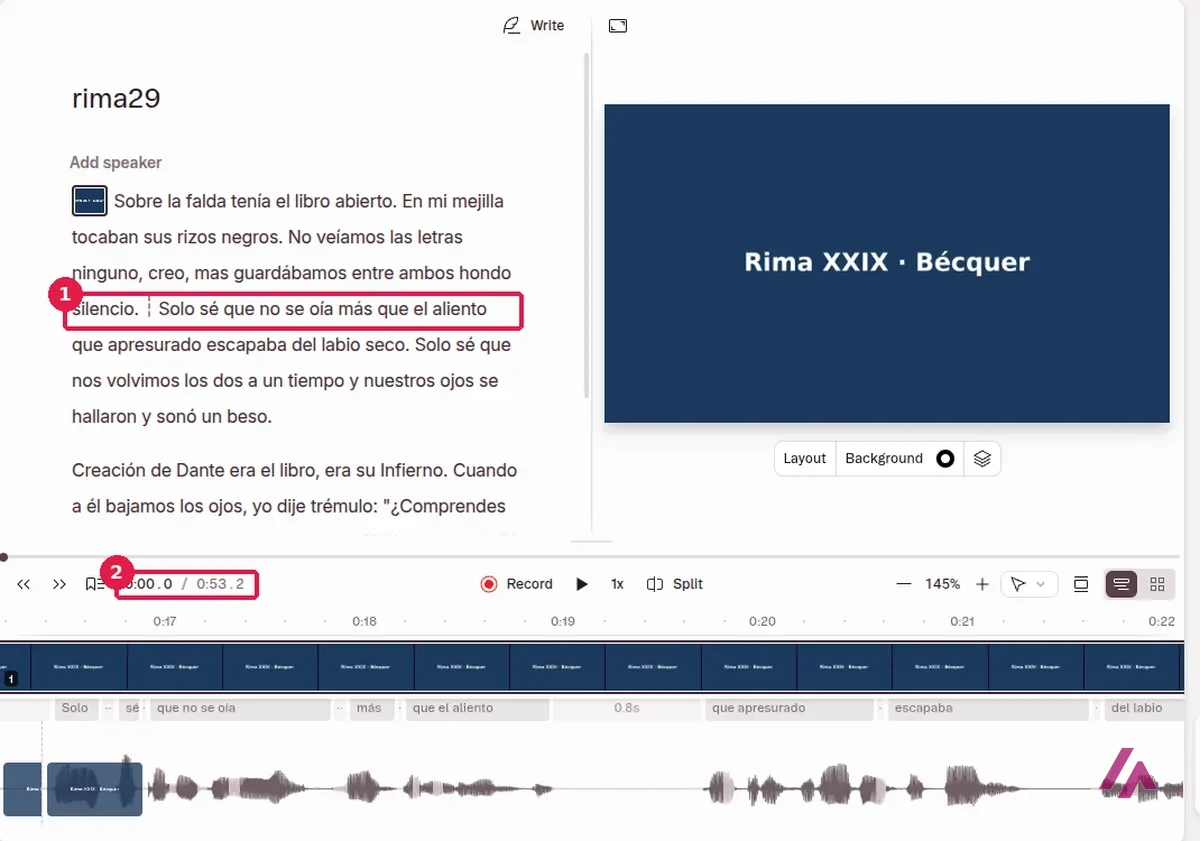
I pressed delete, and the sentence disappeared from the text and from the video at the same time. The clip went from 0:58.6 to 0:53.2, and the transcript keeps a small mark where the cut is. No razor tool, no dragging clips around. If you've ever edited an interview on a timeline, this is the moment Descript sells itself.
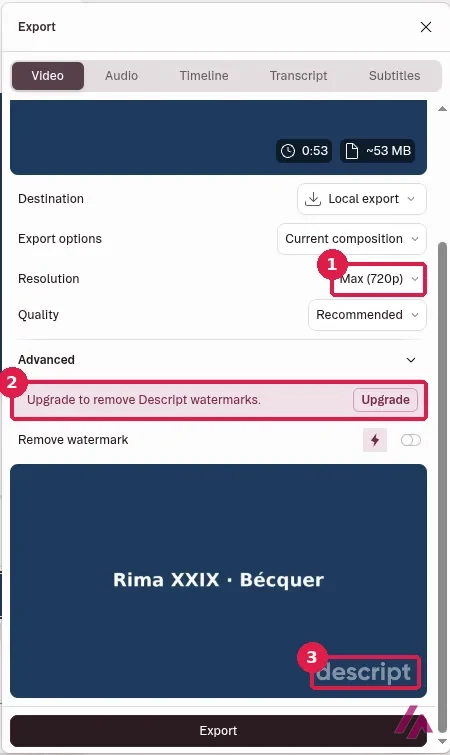
The export window is where the free plan shows its limits. Resolution stops at "Max (720p)", and 1080p, 1440p and 4K are locked. There's a "Remove watermark" switch you can't turn on, and the preview has the Descript logo in the bottom-right corner. The default destination is a Descript web link that anyone with the link can open; to get a file, you pick local export.
Untick this during sign-up (Heads-up)
One step of the sign-up asks you to "Help improve Descript" by letting its team analyze your project information (only to improve the product, it says), and the "Share data with Descript" box comes ticked. If you record interviews, client calls or anything private, untick it before you continue. I did.
Underlord sits in a panel on the right, marked as beta. I left it alone, so my 100 credits were still there when I closed the project. Descript also runs in the browser, and there's a desktop app for Mac and Windows; its download page says "No credit card required."
Is Descript free? What the free plan really gets you
There is a free plan, and the pricing page says it's for getting started "with text-based editing" and to give the AI tools "a spin." That's a fair description, because the numbers are small.
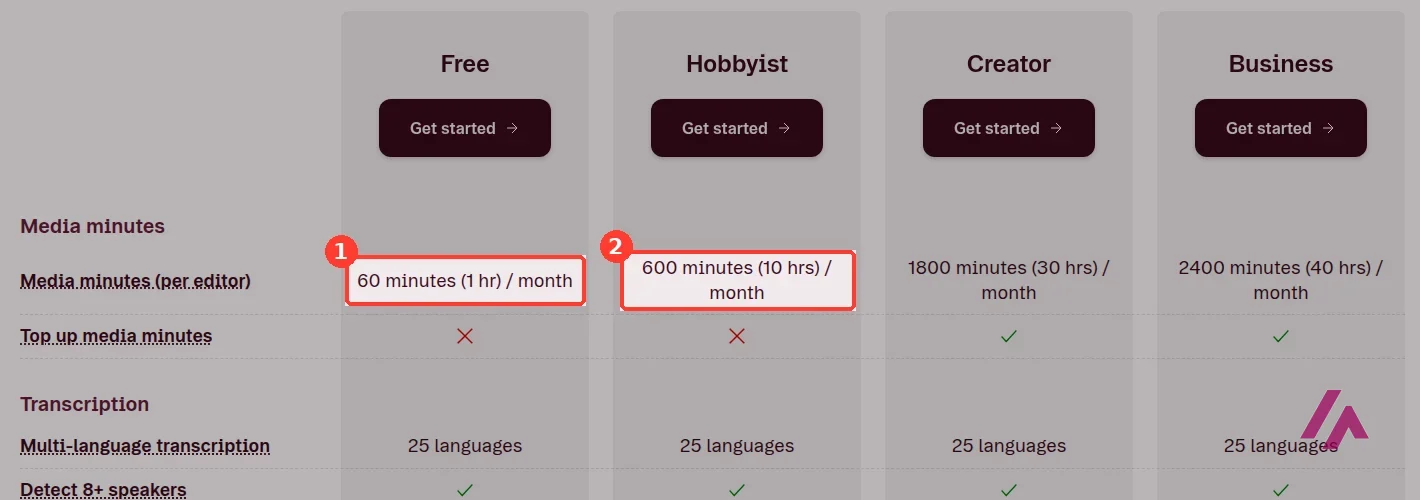
The key limit is media hours, and they don't work the way you might guess. According to Descript's FAQ, they count every file you upload or record in Descript, "regardless of whether they're transcribed." On the free plan you get 60 minutes a month. Import a 40-minute interview and a 25-minute b-roll file and you're over, even if you only edit 5 minutes of it. Sorry for the jargon, but this is the part that matters.
AI credits are the other meter. They pay for Underlord, Studio Sound, Green Screen, Eye Contact and anything generated, and on Free you get 100 once, not every month. The AI tools themselves are marked "Limited" across the board on the free plan.
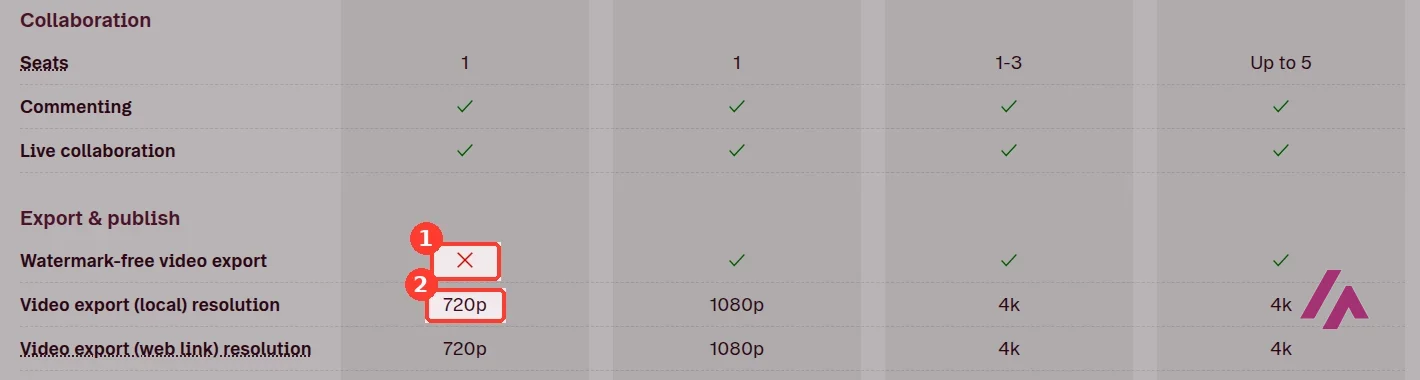
Then there's exporting. As you saw above, free video exports carry a watermark and stop at 720p, so it's fine for testing and not for publishing on your channel. Audio exports are a different story: the table lists audio export duration as unlimited on every plan, Free included. If you make an audio-only podcast, that's worth knowing.
Count your raw footage, not your final cut (Heads-up)
Media hours are spent on everything that goes into Descript, not on what comes out. If you record long and edit short, size your plan by the hours of raw footage you upload or record each month. Hobbyist's 10 hours go fast if you upload every camera angle or long interviews, and Hobbyist can't buy top-ups.
Descript pricing: Hobbyist vs. Creator vs. Business
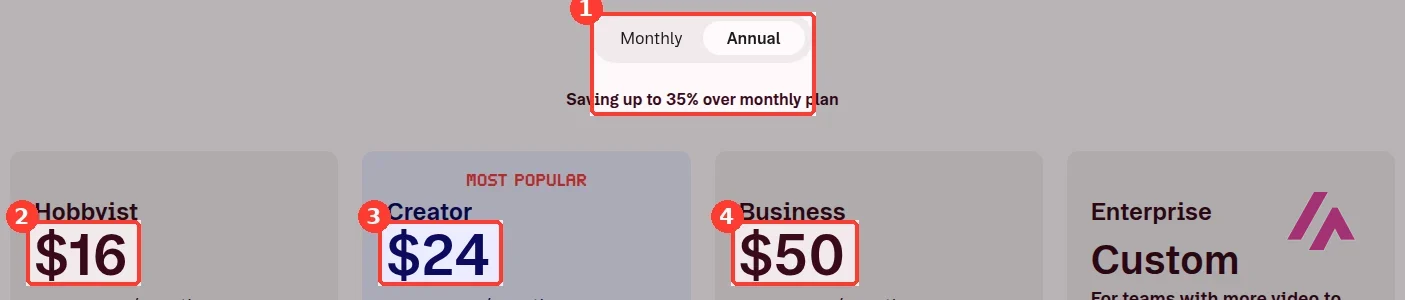
The pricing page opens on yearly billing, which is why the first prices you see are $16, $24 and $50. Flip it to monthly and they go up to $24, $35 and $65. Descript says the yearly plan saves "up to 35%." All prices are per person, per month:
| Feature | Free | Hobbyist | Creator | Business |
|---|---|---|---|---|
| Price per person | $0 | $24 a month, or $16 a month billed yearly | $35 a month, or $24 a month billed yearly | $65 a month, or $50 a month billed yearly |
| Media hours per month | 1 | 10 | 30 | 40 |
| AI credits | 100, one time | 400 a month | 800 a month | 1,500 a month |
| Buy extra hours and credits | No | No | Yes | Yes |
| Video export | 720p, with watermark | 1080p | 4K | 4K |
| Seats | 1 | 1 | 1 to 3 | Up to 5 |
| Upload size per file | Up to 1 GB | Up to 10 GB | Up to 20 GB | Up to 50 GB |
| Cloud storage | 5 GB | 100 GB | 1 TB | 2 TB |
| Stock media search | First 5 results | First 12 results | Unlimited | Unlimited |
Hobbyist is the plan that turns Descript from a demo into a tool: 10 hours of media, no watermark, 1080p and access to Underlord and AI tools like Studio Sound and Remove Filler Words. Creator is the one Descript labels "most popular," and the jump is real: 3 times the media hours, 4K, full access to Underlord plus 20-plus more AI tools, AI video generation, the whole stock library, and, importantly, the option to top up when you run out. Business adds Brand Studio for the team, translation and dubbing in 30-plus languages, custom avatars from a photo or a text prompt, and priority support.
A few details from the FAQ. You don't need a card to try it. Paid plans are charged to your card on the billing cycle you pick, and custom invoicing (like ACH transfer) goes through the Enterprise team. Students, educators and nonprofits can ask for special rates through a form; the page doesn't say how much. You can cancel from your subscription page, and you can delete your account and its data.
If you want a second opinion before signing up, the Style Factory review on this page walks through what Descript does well and where it falls short, and ends with a verdict.
Is Descript worth paying for?
If you publish a few talking-head videos, tutorials or podcast episodes a month, Hobbyist at $16 a month on the yearly plan is a reasonable price for editing by text, as long as your raw footage stays under 10 hours a month. If you film a lot, or you know you'll lean on Underlord and the AI tools, skip straight to Creator: the extra hours and the top-ups are what keep you from hitting the wall mid-project. Business is for teams that need shared branding or dubbing.
If you only need the words, Descript is overkill. Its free hour a month is spent on whatever you upload, and the editor is the part you'd be paying for.
Descript or something else?

For transcripts alone, Buzz is free and runs on your own computer, so there are no hours or credits to count; it's built on Whisper, OpenAI's speech recognition model. If your recordings are meetings, Otter.ai joins the call, takes the notes and writes a summary. If your videos are short social clips and what you're after is styled captions burned into the video, VEED does that in the browser; its free plan exports at 720p with a watermark. And if what you want is to generate video from scratch rather than edit footage you shot, Runway is the place to look.
Written by Miguel Ángel, with help from an LLM to verify facts.
Descript's own short video on Underlord: how to steer edits with plain prompts, brainstorm ideas and cutdowns, and iterate with requests like changing the music or the tone.
Who is it for? For podcasters, YouTubers and anyone who records people talking and hates scrubbing a timeline. Less so if you just want a transcript of a meeting or an interview: a dedicated transcription tool does that for less.
What I like and what I don’t
What I like
- Editing by text works as promised: delete a sentence in the transcript and it's gone from the video.
- A free plan with no card, with text-based editing and a taste of the AI tools included.
- Clear plans: each one spells out its media hours and AI credits.
- Paying yearly saves a third on Hobbyist: $16 a month instead of $24.
What I don’t
- The free plan's 1 hour of media a month includes everything you upload or record, whether you transcribe it or not.
- Free video exports top out at 720p and carry a watermark.
- The box that shares your project data with Descript comes ticked during sign-up; untick it if you'd rather not.
- On Hobbyist you can't buy extra hours or credits; top-ups start at Creator, $35 a month.
Have you used Descript? Tell me how it went
What worked for you and what didn’t. Your experience helps the next person who lands here unsure more than any review page. I read every one before publishing.
Write my review
Descript pricing
Prices checked on the official site on
-
Free
Free
No card; 1 media hour a month, 100 AI credits one time, video exports at 720p with a watermark
- Cheapest paid plan
Hobbyist
$24/mo
Per person; 10 media hours and 400 AI credits a month, 1080p exports with no watermark; $16 a month billed yearly
-
Creator
$35/mo
Per person; 30 media hours and 800 AI credits a month, 4K exports, top-ups; $24 a month billed yearly
-
Business
$65/mo
Per person; 40 media hours and 1,500 AI credits a month, translation and dubbing, priority support; $50 a month billed yearly
Alternatives to Descript
-

Buzz
Free
When to pick it: If you only need transcripts and want them free, on your own computer, with no monthly hours to count.
See details → -
Otter.ai
Free with limits · from $16.99/mo
When to pick it: If what you record is meetings and you want notes, a summary and a bot that joins Zoom, Teams or Google Meet.
See details → -
Clipchamp
Free with limits · from $9.99/mo
When to pick it: If you edit on a timeline anyway and want free exports up to 1080p with no watermark, in the browser or on Windows.
See details →
How I tested it
On November 7, 2026, I signed up for the free plan with a Google account, uploaded a short test clip, let Descript transcribe it, deleted a sentence from the transcript and opened the export window. The prices and plan limits come from Descript's pricing page, its full plan comparison and its FAQ, read in a browser set to US English and checked again that day. I didn't pay for anything.
A review of Descript's pros and cons by Style Factory, ending with a verdict.


Written by Miguel Ángel, with the help of an LLM to fact-check. In IT since 2002 (systems, engineering, web development and SEO), doing business with AI since February 2023, when ChatGPT could first be bought in Spain. I build, write and maintain this site myself.

Got a question? Ask me
About Descript, its plans or whether it fits what you need. I’m Miguel Ángel, and I’ll answer you myself, right here.