Waymark Review: AI Video Ads for Local Advertisers, Pricing and Who It's Really For
10 min read
- Free trial
- Marketing
- Web

My verdict
In IT since 2002: systems, engineering, web development and SEO. I have been doing business with AI since February 2023, when ChatGPT could first be bought in Spain.
Waymark is an AI tool that builds a video commercial from a business's website: logo, colors, photos, script and voiceover, which it sells as ready for TV, streaming or social. It's no longer free to start. The way in is a 7-day trial that asks for a card, then the Starter plan at $399 a month ($350 a month billed annually) with only a handful of final downloads. That makes sense for TV and streaming ad sales teams and agencies that pitch local businesses all week. For a single shop that wants one video, it's an expensive way to get it.
What is Waymark
- Type
- Marketing
- Platforms
- Web
- Free plan
- Free trial
- Updated on
- Nov 15, 2026
Waymark is an AI video ad maker: you give it a business's website and it builds a commercial with that brand's logo, colors, photos, a script and an AI voiceover, which Waymark sells as ready for TV, streaming or social media. How much does Waymark cost? The Starter plan is $399 a month, or $350 a month billed annually, after a 7-day free trial that asks for your card. Is it worth it? If you sell ads to local businesses and need a lot of spots fast, yes, that's exactly who it's built for. If you're one business that wants one video, there are cheaper ways to get it.
Waymark in 30 seconds (Important)
- What it does: turns a website address into a 15- or 30-second video ad, with script, voiceover, music and stock footage, then lets you edit it.
- Who it's for: TV and streaming ad sales teams, agencies, creative teams and ad platforms that serve local advertisers.
- Free? No free plan. Starter has a 7-day free trial, and the checkout asks for a card and starts billing when it ends.
- Price: Starter $399 a month (2 final videos a month) or $350 a month billed annually; Team from $1,125 a month; Enterprise is quoted.
- Where: in the browser only. Waymark's help center says there's no app to download.
What Waymark is today
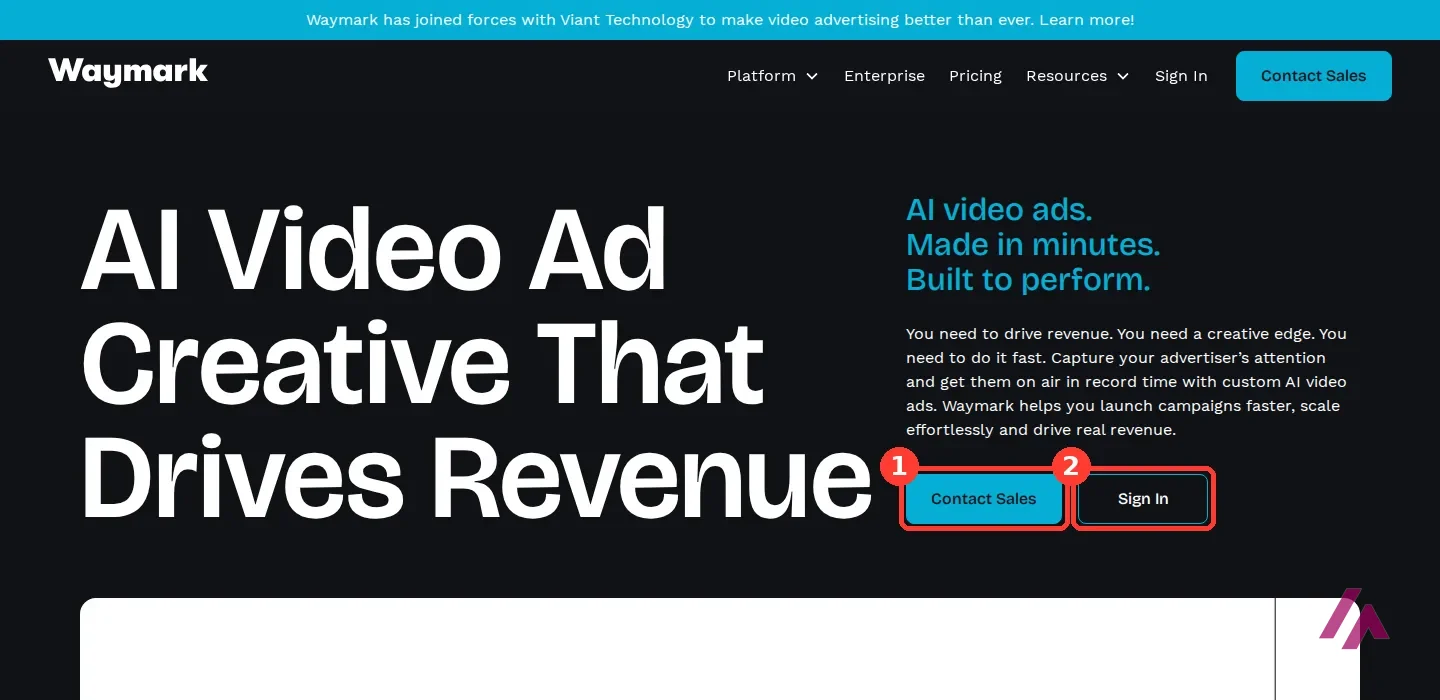
Waymark is about one thing: commercials for local businesses. What has changed is who it talks to. Its home page now reads "AI Video Ad Creative That Drives Revenue", and the two buttons under it are Contact Sales and Sign In. The pitch is aimed at people who sell advertising: media sales teams making "spec ads" (a sample commercial you show a business to win the deal), creative teams that need to produce more spots, and ad platforms that want to offer self-serve video ad creation to their customers.
There's also news. On November 9, 2026, Waymark announced it has agreed to join Viant Technology, a company that runs an advertising platform for connected TV. According to that announcement, Waymark keeps operating under its own name, with the same team, product and login, and current customers' contracts and pricing stay as they are.
Beyond the standard ads, Waymark also offers Waymark Cinematic, a line of more story-driven ads made with generative AI for TV and streaming, and a managed service with a human team for Enterprise customers.
How it works: from a URL to a 30-second ad
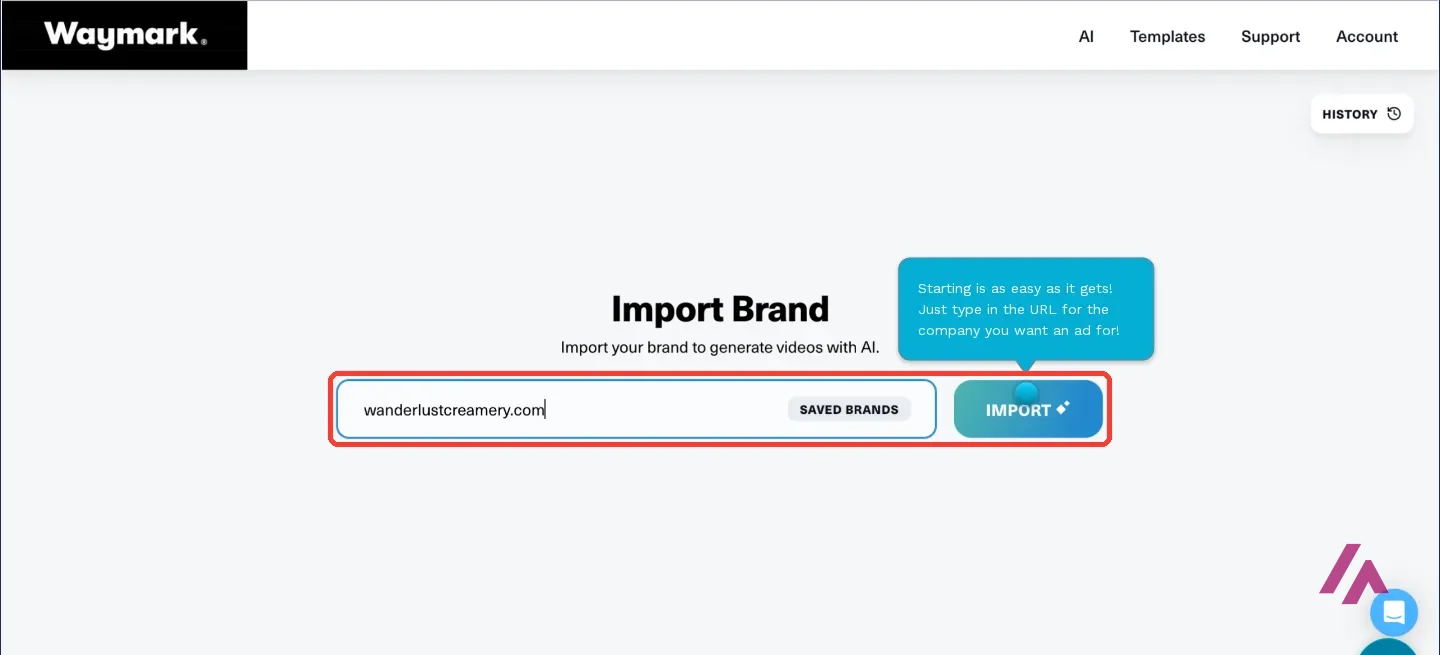
To see the app itself without paying, I went through Waymark's official interactive demo, which clicks through the real interface with a sample business, an ice cream shop called Wanderlust Creamery. The flow starts with the clever part: you type the business's web address and hit Import.
Waymark then checks what it found (logo, colors, images, the "about" text and the industry) and shows a "Your brand looks great" screen. You can open the brand profile and add photos, video clips or fonts before going on.
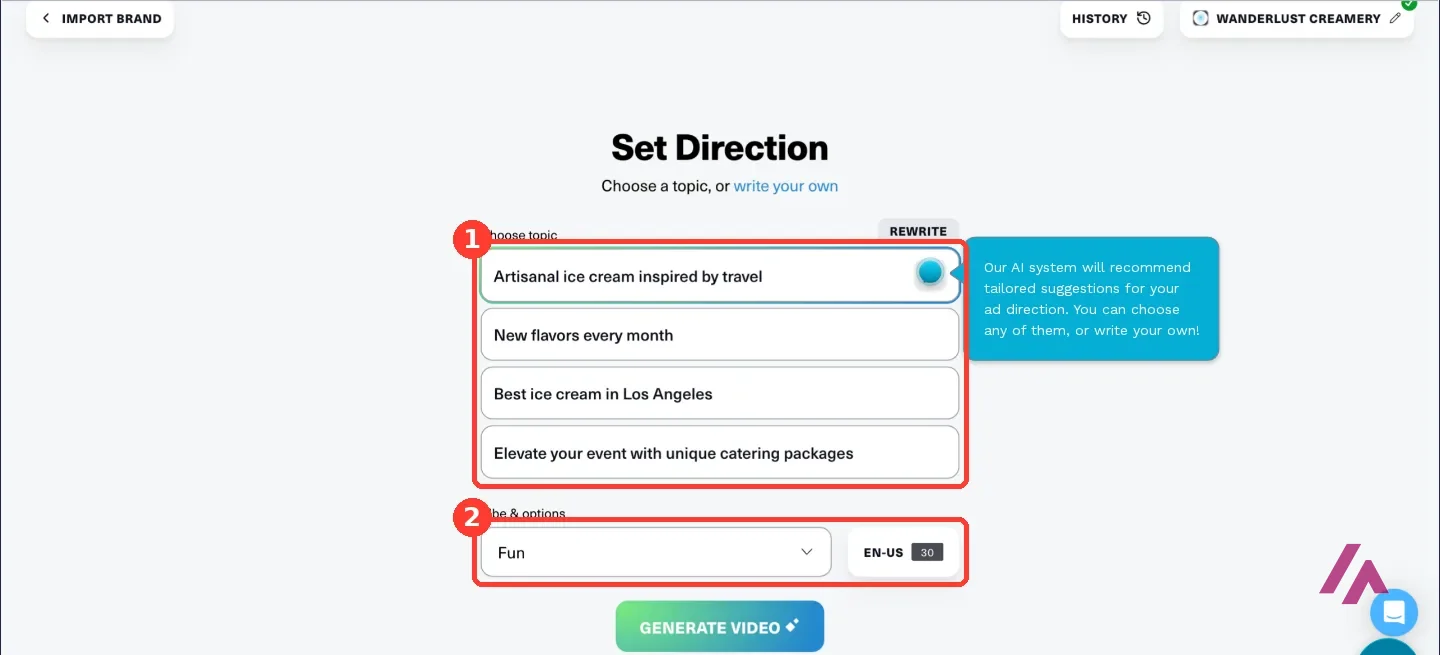
Next comes Set Direction. The AI suggests four angles for the ad, and for the ice cream shop they were "Artisanal ice cream inspired by travel", "New flavors every month", "Best ice cream in Los Angeles" and "Elevate your event with unique catering packages". You can pick one or write your own, choose a "vibe" (Fun, in the demo), the language and the length: 30, 15 or 5 seconds horizontal, or 15 and 5 seconds vertical.
The part I liked most: lock and regenerate
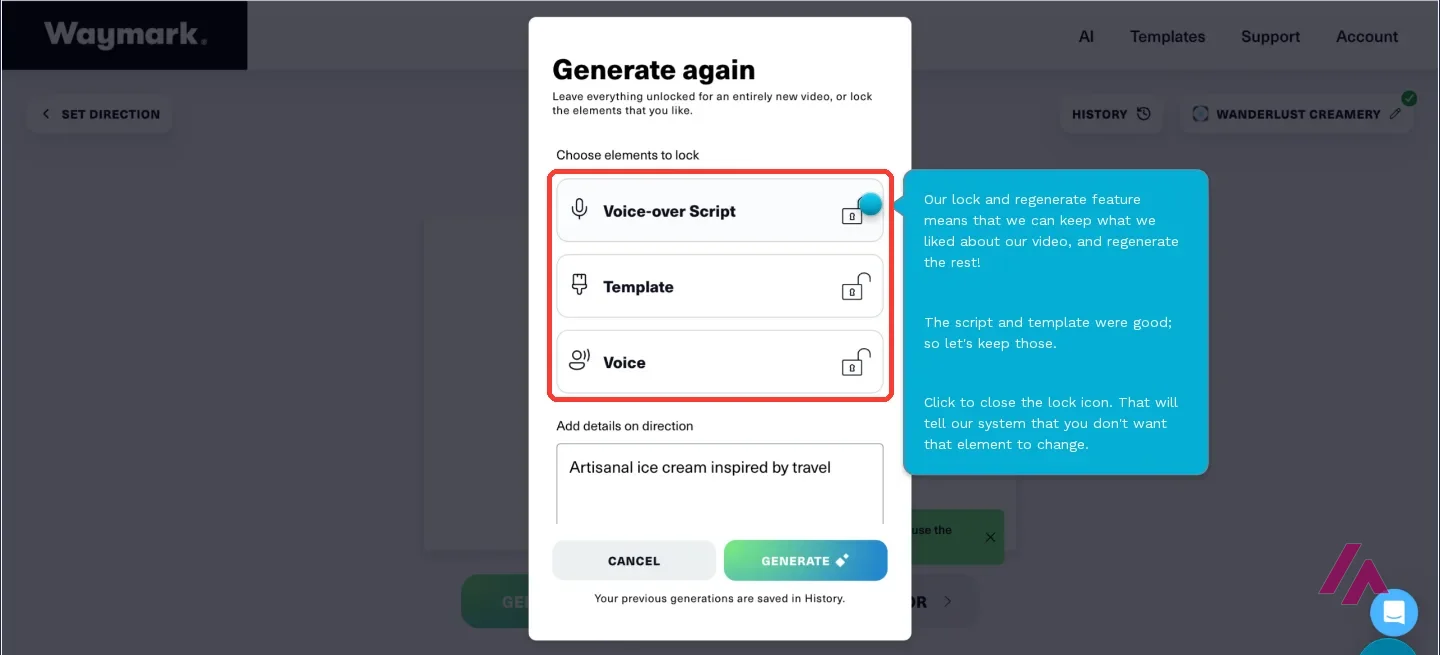
After the first video, you don't have to accept it or start over. A Generate again window lets you lock what you liked (the voiceover script, the template or the voice) and regenerate only the rest. In the demo they keep the script and the template and ask for a new take on everything else. Your earlier versions stay in a History list, so nothing gets lost. It's a small idea, but anyone who has asked an AI for the same thing, only different, knows why it matters.
Drafts are free, downloads aren't (Tip)
According to Waymark's pricing FAQ, every plan includes unlimited drafts. What the plan limits is how many final videos you download each month. So play with directions, locks and edits as much as you like, and only download the version you're actually going to air.
The editor, for people who don't edit video
Then you click Continue to Editor, which is where you'd spend most of your time. Down the left side there are five shortcuts: the timeline by scenes, global options, music, colors and fonts. The global options are switches: show the logo throughout, keep the web address on screen, add a QR code, choose the outro and the fine print. Music is grouped by mood ("Inspiring Rock", "Celebratory Pop"…), you can swap any brand color, and picking a new font changes all the text on screen in one go.
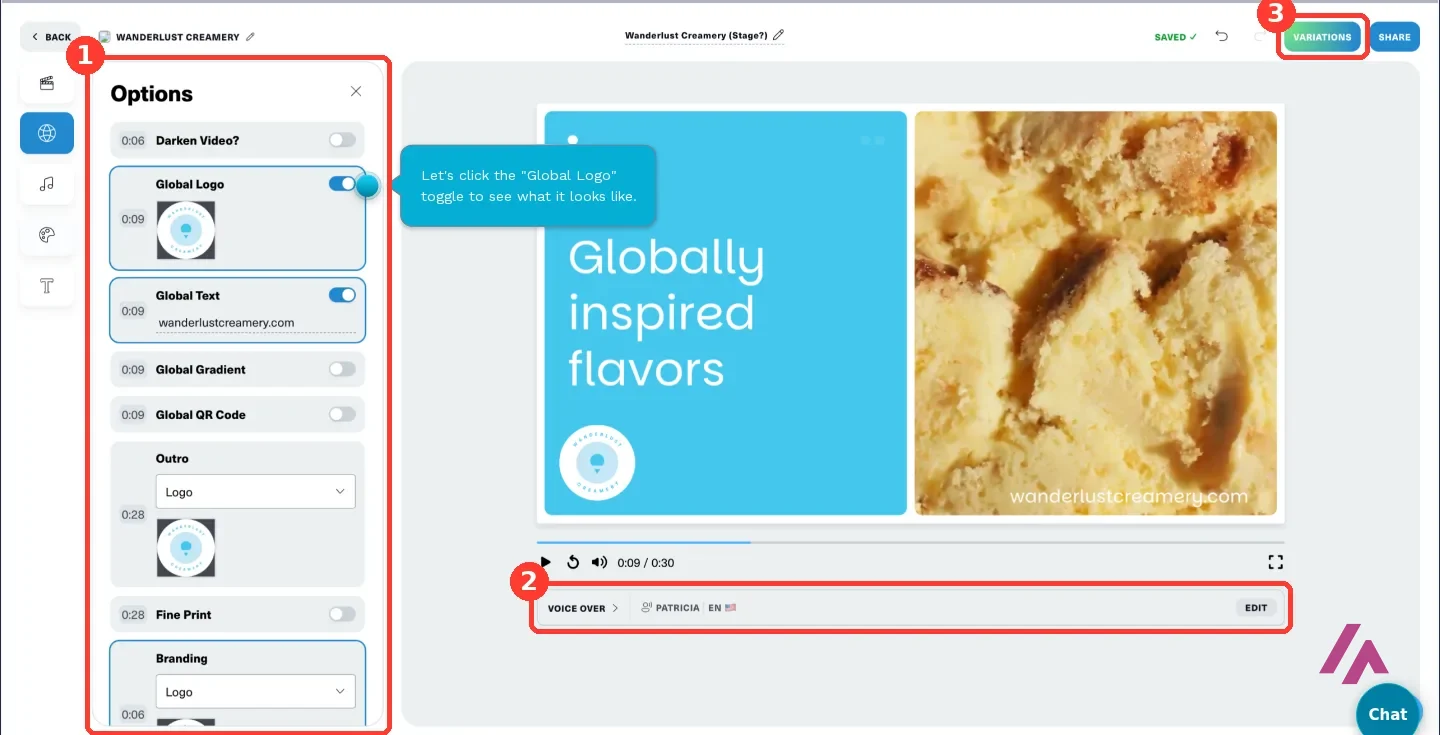
To change a shot, you click it and choose Replace: you can use the brand's own images and clips or search Shutterstock's licensed footage from inside the editor. The voiceover reads the script the AI wrote. In the demo it opened with "Embark on a delicious journey with Wanderlust Creamery, where every scoop tells a story", which is good commercial copy, but it would fit any ice cream shop in the country. If the drafts you get read like that one, you'll want to rewrite the script so it sounds like your client, not like an ad.
Waymark pricing in 2026
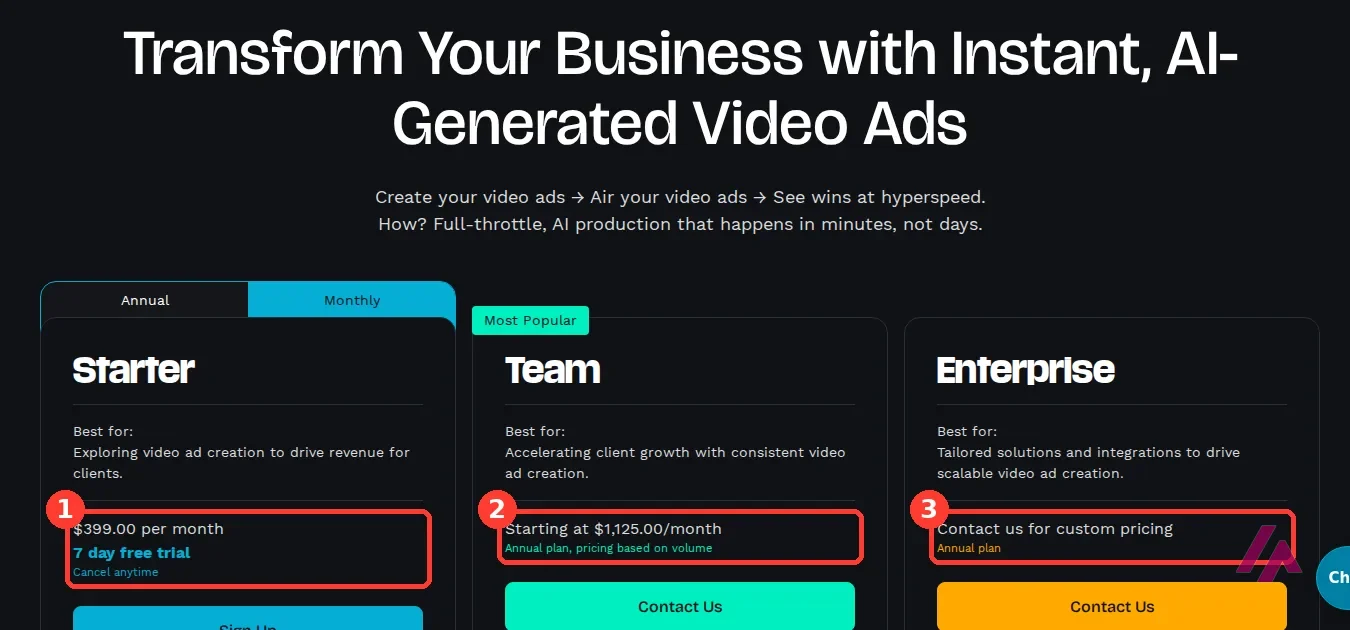
Waymark publishes three plans in US dollars. Starter is the only plan with online sign-up; for Team and Enterprise you contact sales.
| Plan | Price | Final downloads a month | What it adds |
|---|---|---|---|
| Starter (monthly) | $399 a month, cancel anytime | 2 | 1 user, unlimited brands and drafts, AI script and voiceover, stock footage, editor, TV and digital quality downloads |
| Starter (annual) | $350 a month, billed annually | 4 (limited-time offer; normally 2) | Same as monthly |
| Team | From $1,125 a month, annual plan | Based on volume | Several users, translations, Variations, template library, sharing links, onboarding |
| Enterprise | Custom quote, annual plan | Custom | Unlimited users, CRM automations, white labeling, integrations, SSO, a dedicated manager |
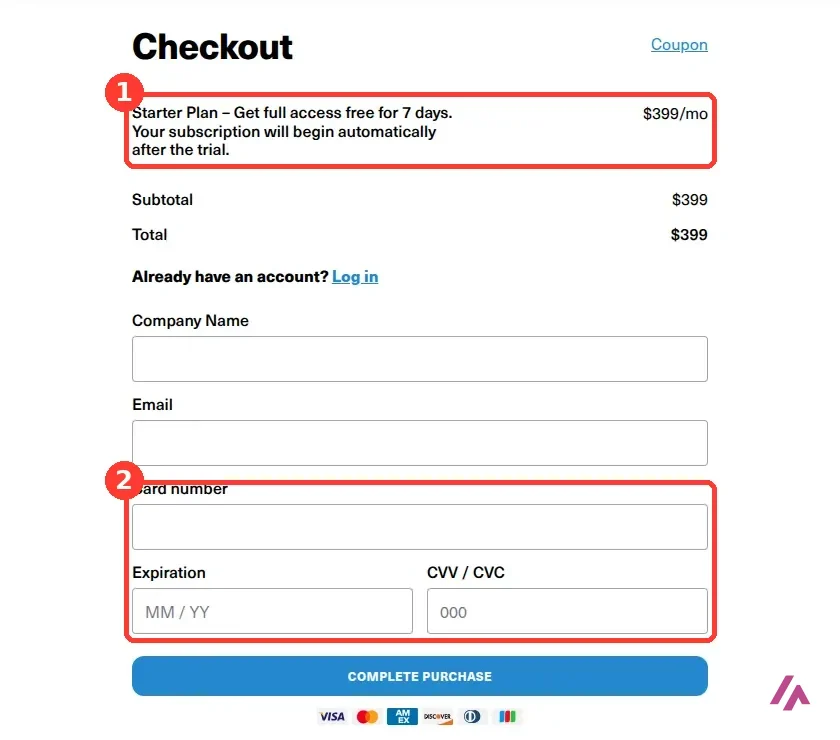
Starter comes with a 7-day free trial. I clicked Sign Up on the monthly plan to see what it asks for: company name, email and card details, with a line saying the subscription starts automatically when the trial ends. That's where I stopped.
Two features you might expect aren't in Starter (Heads-up)
Translations and Variations (Waymark's way to get versions of an ad in other lengths, formats and languages) are on the Team plan and up. Starter also caps your final downloads (2 a month, 4 on the annual plan's current offer), and Waymark's own FAQ says it can't add more on that plan: the next step is Team.
Is it worth $399? Run the numbers per video. If a spec ad helps a sales rep win even one local deal, the plan can pay for itself quickly, and that's the customer Waymark is built around. A florist who wants one ad for Mother's Day is paying around $200 per video on the monthly plan, plus a card on file, and may be better served by a general video tool like InVideo or Canva, which has a free plan.
Who Waymark is really for
If you work in local media sales, at an agency that produces lots of 15- and 30-second spots, or on a platform that sells ad space to small businesses, Waymark fits a real need: going from "this business has a website" to "here's your commercial" without a shoot. The lock-and-regenerate step, the brand profile that builds itself and downloads Waymark describes as TV quality are exactly what that workflow needs.
If you're a business owner making your own ads, you can still use it, but the price is set for a sales team. And if what you have in mind is an ad with a person talking to the camera, an avatar tool like HeyGen fits better; if you already have footage and just need to cut it, VEED is simpler.
Waymark's own short video about making spec commercials for local clients, the kind of ad it was built for.

Who is it for? For people who sell ads to local businesses (TV and streaming sales teams, agencies, ad platforms) and need lots of 15- and 30-second spots fast. Not for a small business owner who needs one or two videos a year.
What I like and what I don’t
What I like
- The starting point is just a website address: in Waymark's demo it pulls the logo, colors, images and business details on its own.
- According to its pricing FAQ, drafts are unlimited on every plan; you only spend a download when you finalize a video.
- The lock-and-regenerate step is smart: keep the script or the voice you liked and ask for a new version of everything else.
- The editor is built for non-editors: global logo and text toggles, music by mood, brand colors, fonts and licensed Shutterstock footage.
What I don’t
- $399 a month for 2 final downloads (4 on the annual plan's current offer) is a lot if you're one business making your own ads.
- The free trial asks for your card up front and turns into a paid plan automatically.
- Translations and Variations, two of the headline features, are only on the Team plan and up, which starts at $1,125 a month.
- Web only: there's no iPhone or Android app.
Have you used Waymark? Tell me how it went
What worked for you and what didn’t. Your experience helps the next person who lands here unsure more than any review page. I read every one before publishing.
Write my review
Waymark pricing
Prices checked on the official site on
- Cheapest paid plan
Starter
$399/mo
2 final video downloads a month, 1 user, unlimited drafts; 7-day free trial with card; or $350 a month billed annually
-
Team
from $1,125/mo
annual plan priced by volume; several users, translations, Variations and template library
Alternatives to Waymark
-

InVideo
from $20/mo
When to pick it: If you want to turn a script or an idea into a marketing video yourself, without a sales team's budget.
See details → -
HeyGen AI
Free with limits · from $29/mo
When to pick it: If your ad needs a talking presenter or an AI avatar instead of brand footage and a voiceover.
See details → -
VEED
Free with limits · from $12/mo
When to pick it: If you already have footage and want a simple online editor for subtitles, cuts and social formats.
See details →
How I tested it
On November 15, 2026, I went through Waymark's US website in English: the home page, the pricing page in both monthly and annual billing, the help center and the news about Viant. I clicked Sign Up on the Starter plan and reached the checkout, which asks for a card before the 7-day trial, so I stopped there and paid nothing. Then I clicked through Waymark's official interactive demo from start to finish, which walks the real app with a sample ice cream shop: importing the brand, choosing a direction, regenerating and editing. I wrote this myself, Miguel Ángel, with help from an LLM to verify facts.
A 30-second spot from Waymark Cinematic, its line of generative AI ads for TV and streaming.


Written by Miguel Ángel, with the help of an LLM to fact-check. In IT since 2002 (systems, engineering, web development and SEO), doing business with AI since February 2023, when ChatGPT could first be bought in Spain. I build, write and maintain this site myself.

Got a question? Ask me
About Waymark, its plans or whether it fits what you need. I’m Miguel Ángel, and I’ll answer you myself, right here.