PicFinder
4 min read
Price Check it on their site
PicFinder offers an image generation speed as fast as an image search. By using generative AI models and a touch of magic in its infrastructure, PicFinder has become the fastest and easiest to use…
Review pending a full check. Published in June 2023, last updated on June 23, 2023. It does not have yet what my current reviews have: dated, checked prices, my own screenshots and my verdict.
What is PicFinder
- Type
- Design
- Updated on
- Jun 23, 2023
What makes PicFinder different from other image generation tools?
PicFinder uses similar technologies to Midjourney or Dall-E, at its core, but what makes it unique is its focus on speeding up image generation and providing a much simpler experience. They have been inspired by how easy it is to search for images on the web and wanted to create a service that makes it just as easy to generate images.
The overwhelming majority of the images you will see are generated from scratch. However, when the slogans are very similar, you can also display some previously generated images, as they would be highly relevant to the slogan.
PicFinder is a freemium service. It offers a starting level that currently includes the generation of 1000 images. Once this limit is reached, users are prompted to sign up for a free account that includes a daily allotment of 1000 images, or upgrade to a paid plan to access infinite image generation.
The goal of this tool is to make it as easy as possible to generate beautiful images and find inspiration. Most image generation services create only 4 images per set and then require retrying. Each try can take anywhere from a few seconds to a minute, and it can take many tries to find the exact image you need. As a result, it can take a long time to create a storyboard, character concepts or just find the exact image you need.
Instead of making you wait every 4 images, PicFinder allows you to infinitely scroll through the images for each prompt. You can also click on a result and then infinitely scroll through variations of that result, or change the target using that result as a base. You can also use a sample image you have, add a setpoint and again scroll infinitely through the results. All this is possible because PicFinder is incredibly fast. Images are generated in real time as you scroll. The experience of searching for images or ideas is much more rewarding and fluid, and puts your ideas and creativity at the center.
PicFinder has an API that can be used for real-time image generation. Game studios and tools for designers, writers and creators in general are already integrating PicFinder into their platforms.
How does PicFinder work?
Start using PicFinder
Type any command in the PicFinder search bar to instantly start generating infinite images. Click on the images you like to set them as a base and generate variations instantly.
How to create your setpoints
Creating the right setpoint will help you get better results with each generation. Here are some essential points to keep in mind:
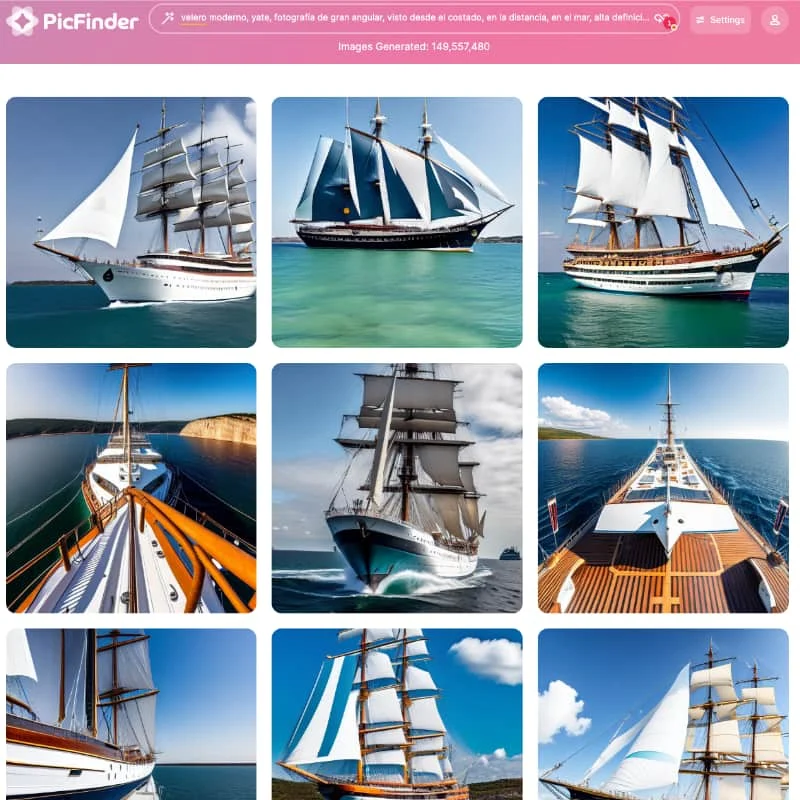
- More detail is better. Always use slogans of at least 5 words instead of just one word. You will get much better results if you clearly describe the result you want to achieve. In a normal conversation, it is not necessary to explain everything in detail because we have so much context around us. For example, if you tell someone you want a sailboat, they will understand that you mean a real boat, not an illustration or a schematic of a boat. However, PicFinder’s AI engine only has the context you provide. If you just type in a word like “sailboat,” the AI engine will imagine that concept in different ways, generating more photorealistic boat images, high-definition illustrations, or even old-style paintings. In contrast, if I specify the exact type of boat I would like to see, the results will be very different. The tagline below would be “modern sailboat, yacht, wide-angle photograph, viewed from the side, in the distance, at sea, high definition”. Adding a few additional words only takes a few seconds, but can help you get to the desired result faster.
- The order of the words in your slogan matters. The closer to the beginning of the tagline you place a word, the more priority it will have in the generation of the image.
- You can change the importance of words or concepts. You can increase the importance of a word by placing it in round brackets [word] or decrease it by placing it in square brackets [word]. The more brackets you add, the greater the effect. For example, (((word))) will have an effect 3 times greater than (word).

Review by Miguel Ángel, with the help of an LLM to fact-check. How I test the tools
Have you used PicFinder? Tell us how it went
What worked for you and what didn’t. Your experience helps the next person who lands here unsure more than any review page. I read every one before publishing.
Write my review
Other design AI tools on the site
Similar by type and use. I have not compared them one by one with PicFinder yet.
-
Midjourney
This AI tool allows you to create unique and spectacular artistic canvases with just a few clicks. Midjourney is a company or research lab that focuses on using artificial intelligence to generate…
See review → -
Leonardo.Ai
Leonardo.Ai is an Artificial Intelligence tool that will allow you to create stunning images in less time and with greater precision than any other tool on the market.
See review → -
CHARL-E
CHARL-E is an application that generates images using the Stable Diffusion package in a simple interface.
See review →

Got a question? Ask me
About PicFinder, its plans or whether it fits what you need. I, Miguel Ángel, answer right here.